My self-hosted AI platform with vLLM and Semantic Router
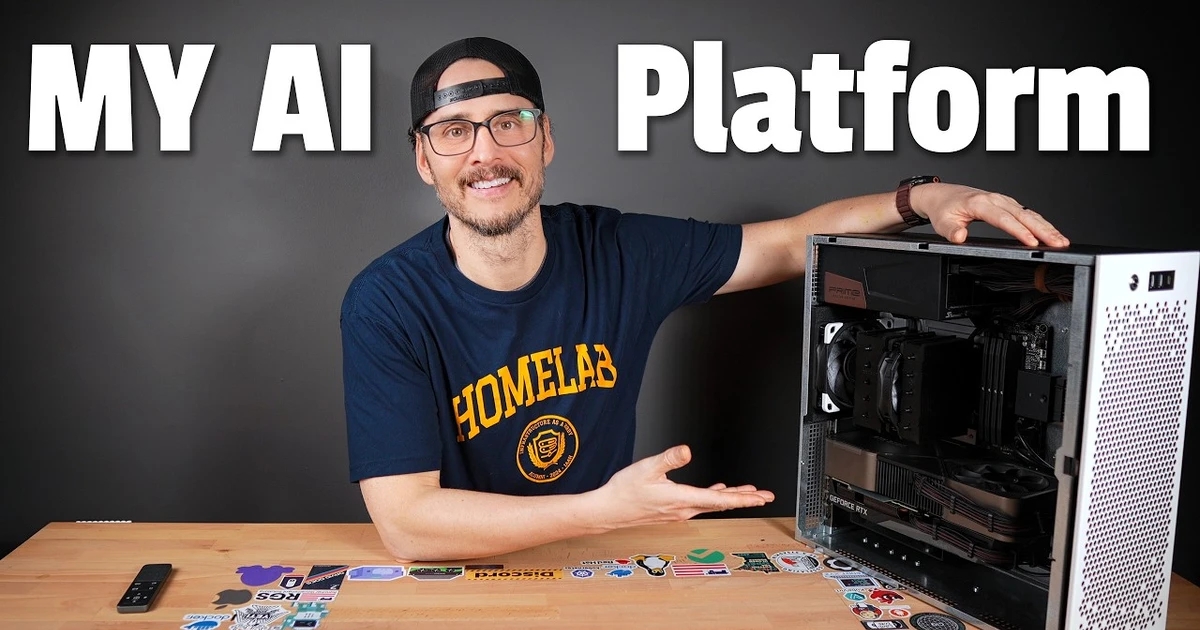
I’ve been running local AI models for a while now, and the models themselves are only part of the problem. I’ve got different GPUs, a couple of other AI machines, models running in vLLM, and a few things I want to run on the Intel NPU. Then there are the applications that need to use all of this. GitHub Copilot, Open WebUI, Home Assistant, and anything else that can talk to an OpenAI-compatible API.
I don’t really want to choose a machine and a model every time I send a request. And I definitely don’t want to update every application when I change which model I’m running. I wanted one place for my AI services, where the hardware and models could change without changing how I use them.
So I’ve been building out my own self-hosted AI platform around the hardware I already have. Some requests should run on the 3060, while others need the bigger model on the 3090. I can keep embeddings and speech on their own hardware, then give clients one endpoint instead of a different address for every service. It does add more services to manage, but at least I don’t have to carry all those decisions into every application.
In the video I walk through the actual hardware and the models I’m running. Here I’ll go a little further into how the pieces connect, why I chose them, and how you can try a smaller version yourself without needing my Ansible configuration or all of this hardware.
What I was trying to fix
My original approach was pretty straightforward. I’d start a model server, point an application at it, and use it until I needed something different. That works fine when you’ve got one machine and one model. It gets harder when you have several services with different strengths and different requirements.
I started experimenting with routing in my earlier post on automatic local AI model routing with NVIDIA Switchyard. I wanted a faster model to handle ordinary coding work and a more capable one to take over when the work got difficult. Since then I’ve moved the main platform over to vLLM Semantic Router. Switchyard was useful for those earlier experiments, but it isn’t the router I’m running now.
The new goal is broader than choosing between two language models. I also have services for speech, vision, and retrieving information from documents and repositories. I want applications to have a consistent way to reach them without having to know which GPU is involved.
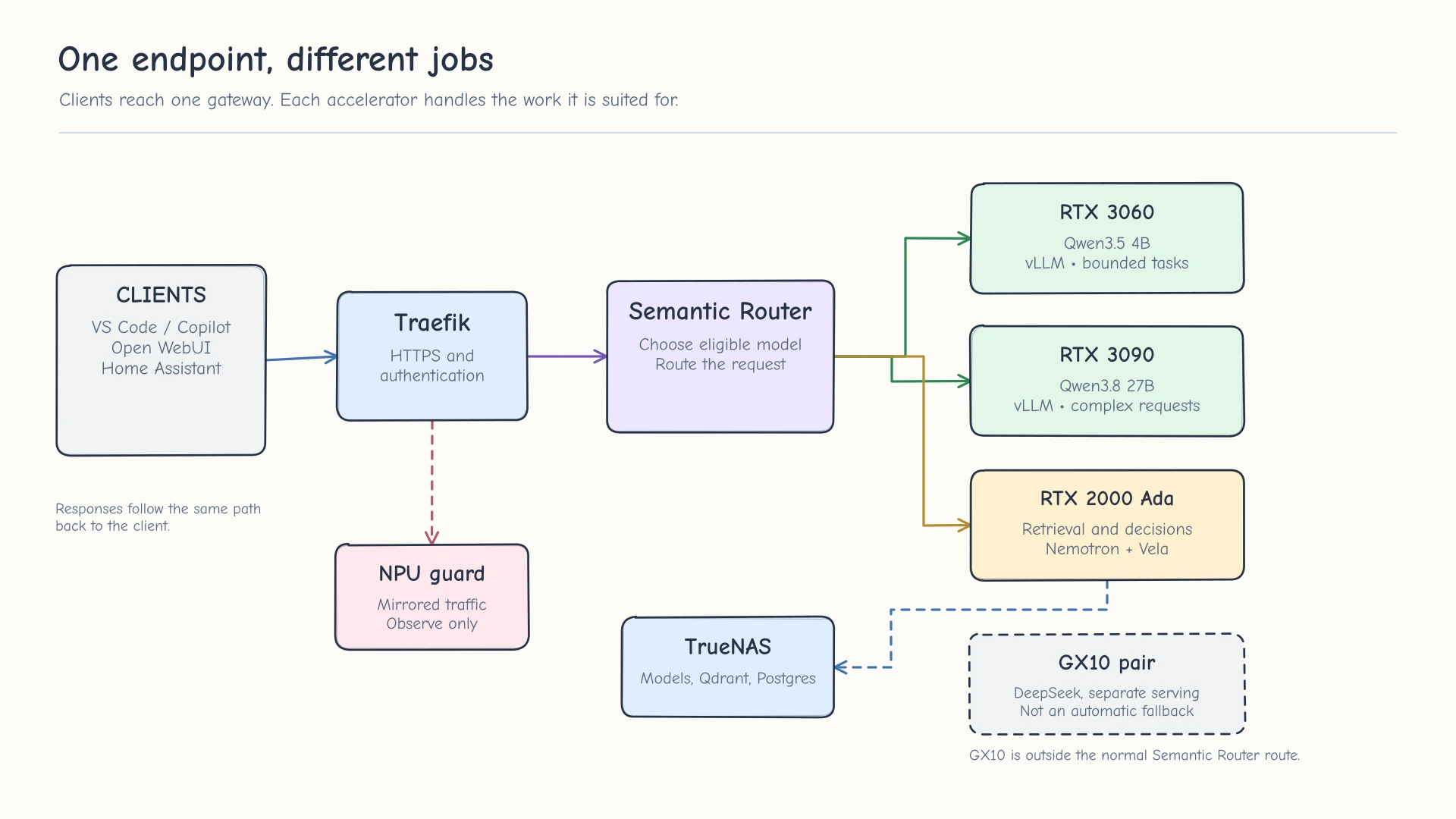
Clients use one entrypoint. Semantic Router chooses a backend while the other services handle their own jobs.
The hardware I’m using
Most of the platform runs on one Linux server I call ai-01. It’s built around an Intel Core Ultra 7 270K Plus, 128 GB of DDR5, and three NVIDIA GPUs. I didn’t start with three identical cards because I already had some of this hardware and wanted to find useful jobs for each one.
| Hardware | Model or service | Job |
|---|---|---|
| RTX 3090, 24 GB | RedHatAI/Qwen3.8-27B-INT4 | Larger coding and reasoning requests, long context, and final answers |
| RTX 3060, 12 GB | RedHatAI/Qwen3.5-4B-quantized.w4a16 | Short answers, simple edits, workspace inspection, and other bounded tasks |
| RTX 2000 Ada, 16 GB | Nemotron embeddings, reranking, visual retrieval, and Vela | Finding information and helping make routing decisions |
| Intel NPU | Whisper Small and Kokoro, using OpenVINO | Speech-to-text and text-to-speech |
| Intel integrated GPU | OpenVINO vision encoder | Image processing for the vision path |
That RTX 2000 Ada row is actually several services. It hosts nvidia/Nemotron-3-Embed-1B-BF16 for text embeddings, vllm-sr/Vela-2.0-0.3B for decisions, and smaller Nemotron models for reranking and visual embeddings. Each service has its own job and runtime. One GPU doesn’t have to mean one model.
I’m also using TrueNAS to store my model library and the data behind some of these services. I don’t want a complete copy of every large model on every machine. I’ve written separately about caching NFS files locally with FS-Cache, which helps with repeated model reads from that central storage.
I still have two GX10 machines running DeepSeek V4 Flash. They’re useful for separate experiments and serving workloads, but they aren’t currently automatic fallback targets for this Semantic Router configuration. I want to keep that distinction clear because there’s a difference between having a model available somewhere on the network and having it qualified as a route for an agent request.
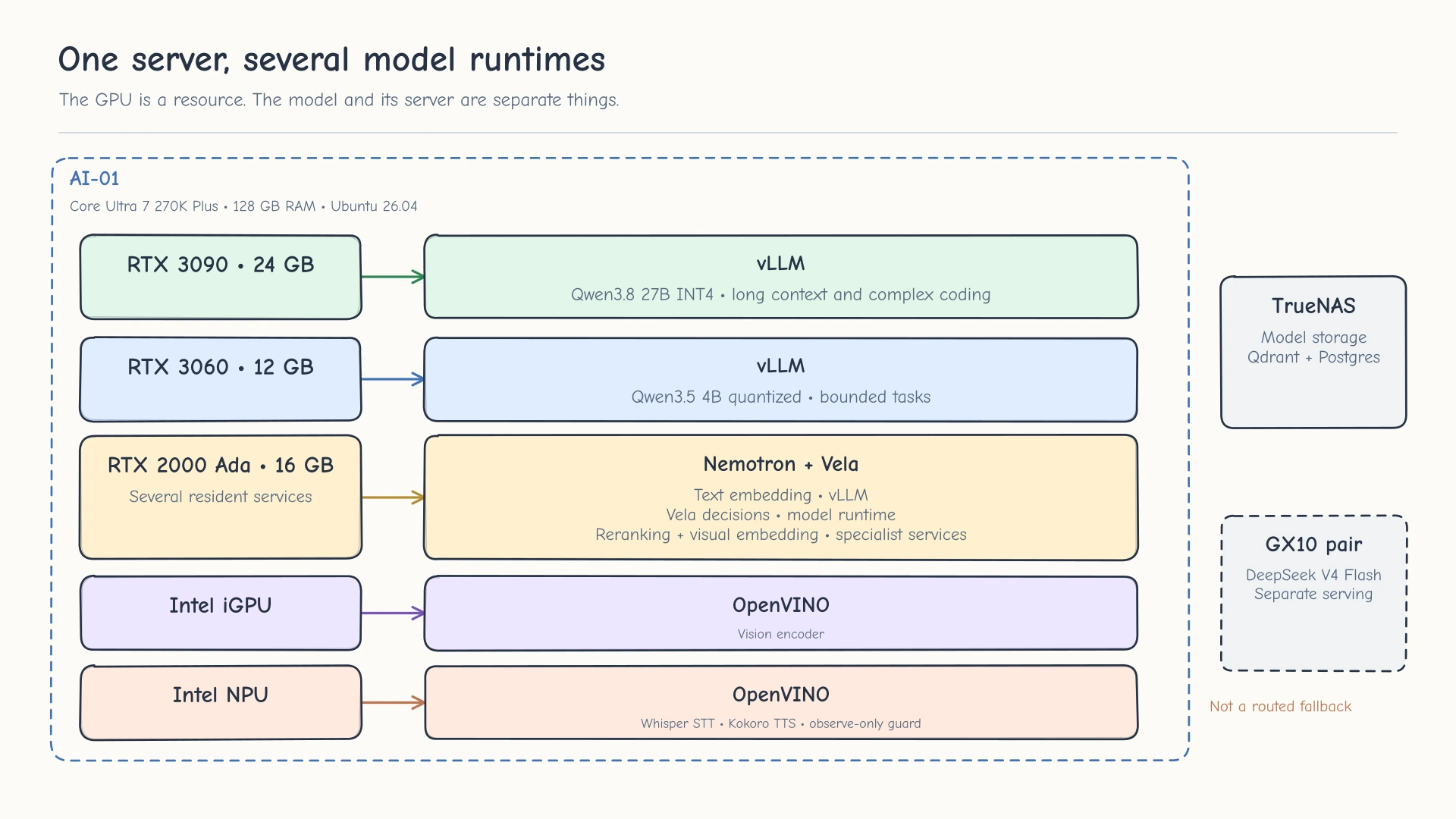
Different hardware handles different types of work. Some devices run more than one model or service.
How a request gets to the right model
On the client side, I expose a single model called self-hosted, shown as Self-Hosted AI. The client doesn’t need to know whether a request will land on the RTX 3060 or RTX 3090. It sends a normal request to the gateway, and the gateway returns the response through the same connection.
Traefik handles the HTTPS entrypoint and authentication. It passes requests to Semantic Router, which looks at the request and the available model capabilities before choosing where it should go. The chosen vLLM server runs the model and streams the response back through the router.
One important thing here is that the router doesn’t take over the job of the application. When I’m using Copilot, Copilot still owns its agent loop, tool calls, repository changes, and conversation history. Semantic Router chooses a model for the request it receives. It doesn’t decide that Copilot has finished the task or execute Copilot’s tools for it.
For an ordinary question, the smaller Qwen model might be enough. A request with more context, difficult reasoning, or requirements the small model can’t handle needs the larger Qwen model. And if a request needs a tool, the selected backend still needs to support that tool and its request format. Routing based only on the words in the prompt isn’t sufficient.
I’ve had to spend more time on this than I expected. A short request can arrive with a large tool catalog or a long conversation, and a model that looks like the right choice from the prompt alone may not actually be able to accept it. That’s why I’m paying attention to context limits, output budgets, tool compatibility, and actual request shapes instead of just changing a few routing keywords.
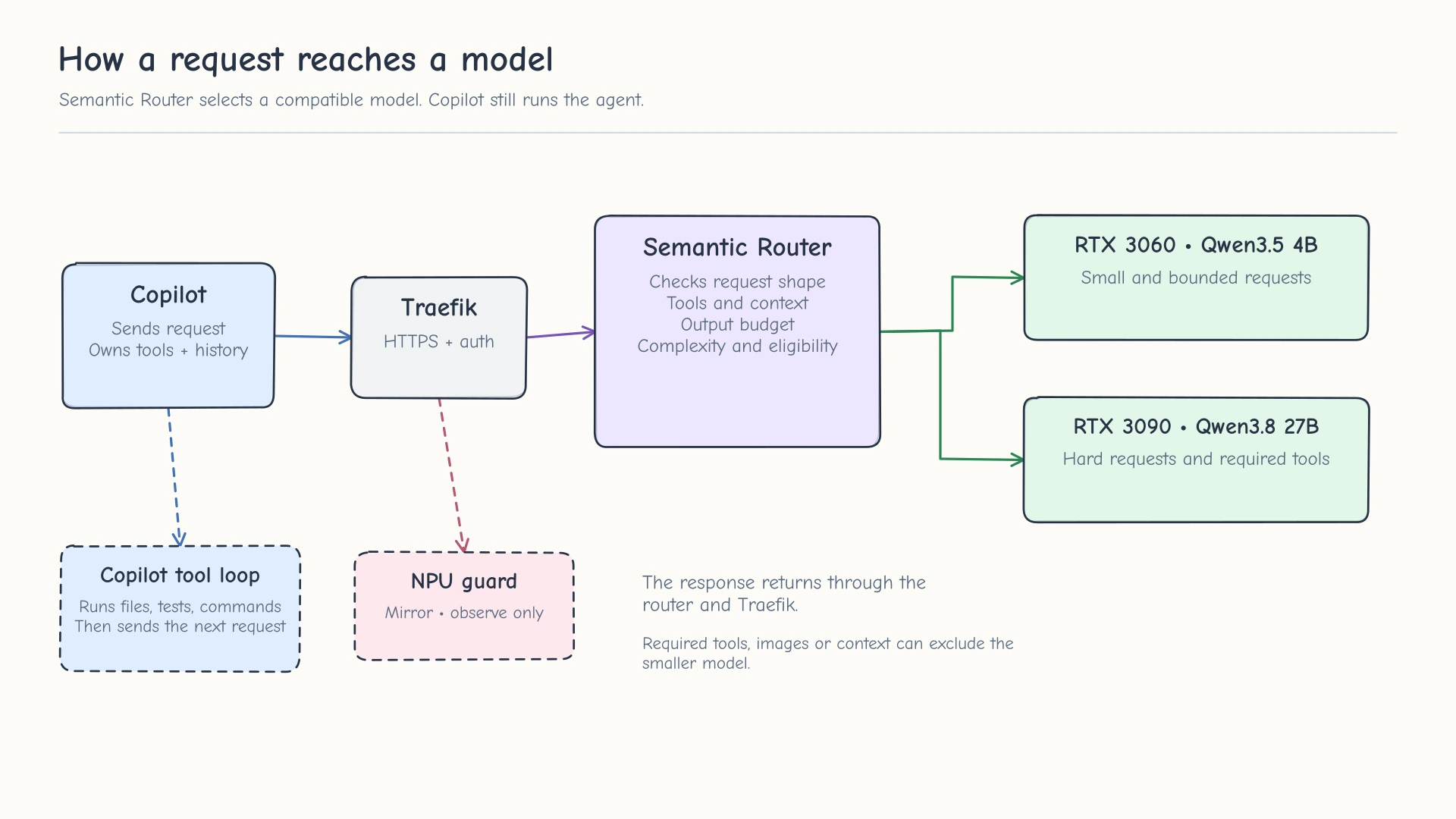
The decision is based on what the request requires, not only which prompt sounds easy.
Where retrieval fits in
A language model doesn’t automatically know what’s in my repositories, notes, or documentation. I need a way to find the relevant information before asking it to answer a question about those files.
That’s where retrieval-augmented generation, or RAG, comes in. The embedding service converts documents and questions into vectors that can be compared. I store those vectors in Qdrant, with PostgreSQL handling metadata for the retrieval system. When a request needs information from those sources, the retrieval path looks for matching material, reranks the results, and provides useful context to the model that will answer the question.
The RTX 2000 Ada is a good place for these smaller services. I can keep embeddings and reranking available without taking up memory on the 3090 that I’d rather use for generation. But it also means I have to check the entire path. A good embedding score doesn’t prove that the router selected retrieval, or that the retrieved passages are actually the right evidence.
This is still one of the areas I’m tuning. An explicit request to search shared knowledge and a question that should automatically use that knowledge aren’t always the same routing case. I’m testing both, along with questions where the answer should come from the conversation rather than retrieval. The examples further down intentionally leave RAG out until the basic model routing is working.
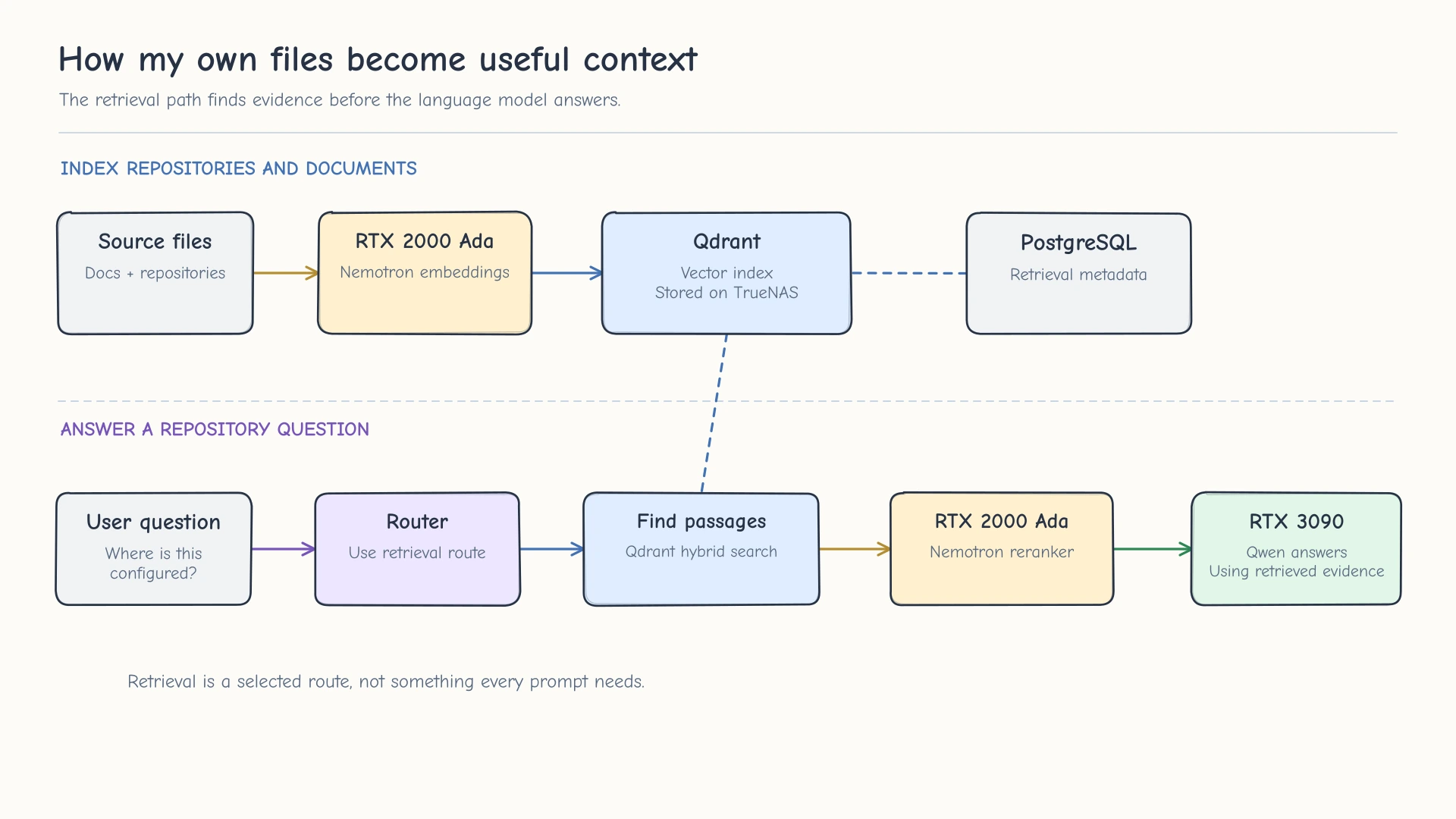
The retrieval services find evidence. The generation model uses that evidence to answer.
What about speech and images?
I also wanted to use parts of the CPU that normally sit idle when I’m running NVIDIA models. My Intel processor has an NPU and integrated graphics, so I started experimenting with OpenVINO to run smaller models there.
For speech-to-text I’m using Whisper Small on the NPU, and for text-to-speech I’m using Kokoro. Open WebUI and Home Assistant can use these capabilities without having to send speech through the 3090 language model. The model still has to understand the transcribed request, but transcription and voice generation are separate jobs.
The integrated GPU is being used for the vision encoder, with the larger language model handling the response side. I’m still working through some of the multimodal request and tool compatibility details. Getting an encoder to run on the iGPU doesn’t prove that every image-and-tools workflow works end to end, so I’m treating those as separate tests.
There’s also an advisory prompt-injection detector on the NPU. At the moment it sees mirrored traffic and records what it finds. It doesn’t sit inline and block requests. I can gather data about what it detects without turning an experimental classifier into a reason for ordinary requests to fail.
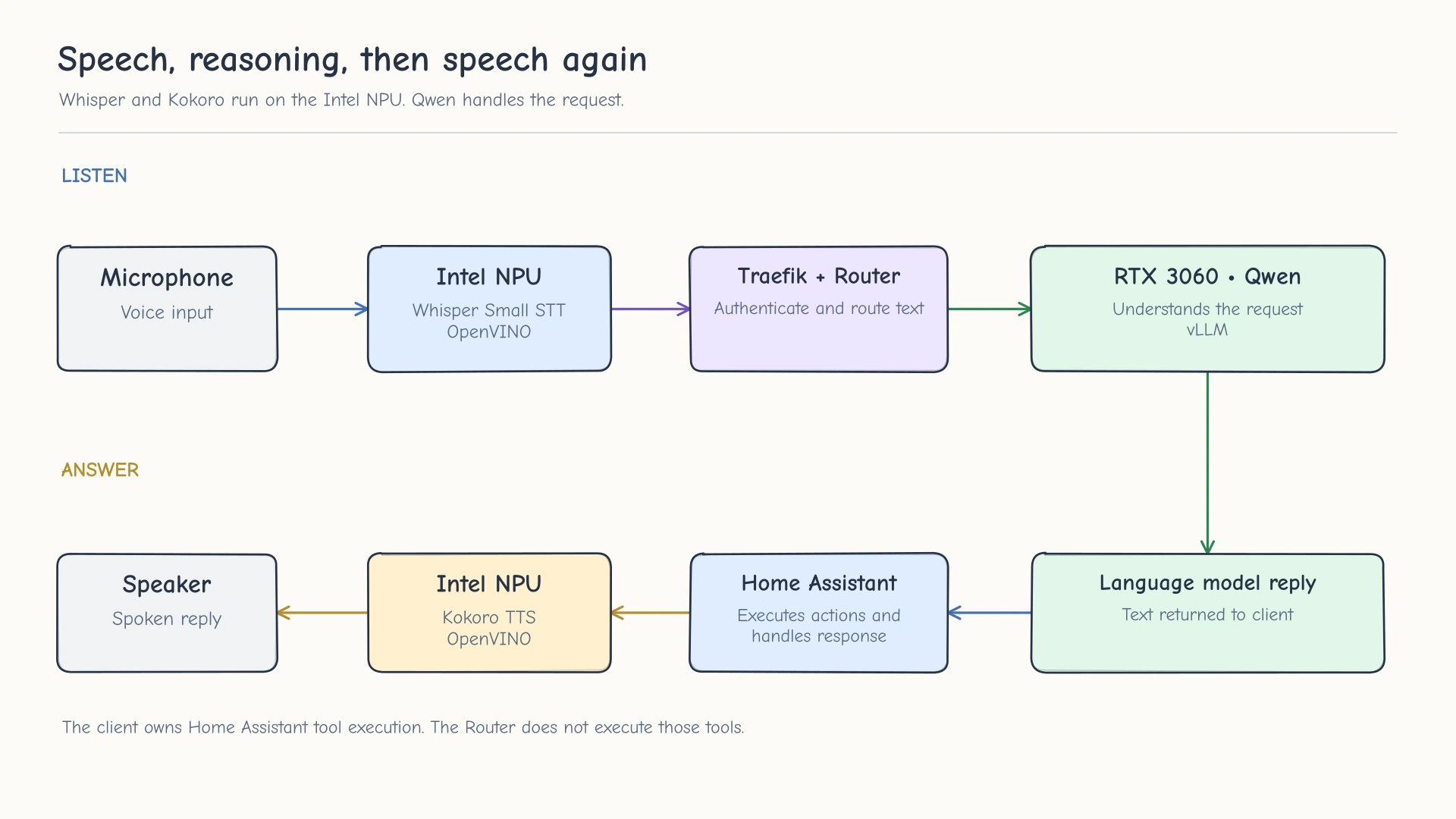
Speech models handle audio while the language model handles the request.
Try a smaller version with Docker Compose
The full platform is managed with Ansible, and that configuration includes quite a bit of infrastructure specific to my homelab. Copying those playbooks wouldn’t be a particularly useful starting point for someone with one NVIDIA GPU.
Instead, here’s a much smaller example with two local Qwen models served by vLLM and a Semantic Router policy that can choose between them. It uses one Linux host with Docker, and it keeps the inference servers separate from the router. That’s the same basic idea as my platform, without the storage, RAG, voice, and other services.
The sample files are in examples/ai-router alongside this post. You’ll need an NVIDIA GPU with enough free VRAM for both models. 16 GB is a reasonable place to start for this example, but the memory use depends on the GPU, driver, vLLM build, and requested context length. You can also run the models on separate GPUs after changing the Docker GPU reservations.
Warning. This is a local experiment, not an internet-facing deployment. The Compose example publishes two vLLM ports without authentication so the router can reach them. Restrict those ports using your firewall and don’t forward them through your home router. My production entrypoint has a separate HTTPS and authentication boundary.
First, make sure Docker can use the GPU
You need the NVIDIA driver, Docker Engine with Compose v2, and the NVIDIA Container Toolkit. Before trying to load a model, check that the container runtime can see your card.
1
2
nvidia-smi
docker run --rm --runtime=nvidia --gpus all ubuntu nvidia-smi
If the second command can’t see your GPU, fix Docker’s NVIDIA runtime configuration before continuing. Semantic Router won’t fix a model server that can’t access its hardware.
Start two vLLM models
This example uses Qwen3 0.6B for small requests and Qwen3 1.7B as the larger model. These are intentionally small enough to try without my GPUs. Neither one is the 27B or 4B checkpoint I’m using in production, and their relative size doesn’t guarantee one will answer every question better than the other. Create compose.yaml with the following contents.
1
2
3
4
5
6
7
8
9
10
11
12
13
14
15
16
17
18
19
20
21
22
23
24
25
26
27
28
29
30
31
32
33
34
35
36
37
38
39
40
41
42
43
44
45
46
47
48
49
50
51
52
53
54
55
56
57
58
59
60
61
62
63
64
65
services:
  vllm-fast:
    image: vllm/vllm-openai:v0.32.0
    restart: unless-stopped
    ipc: host
    ports:
      - "8000:8000"
    volumes:
      - hf-cache:/root/.cache/huggingface
    environment:
      HF_HOME: /root/.cache/huggingface
    command:
      - --model
      - Qwen/Qwen3-0.6B
      - --host
      - 0.0.0.0
      - --port
      - "8000"
      - --max-model-len
      - "4096"
      - --gpu-memory-utilization
      - "0.24"
      - --default-chat-template-kwargs
      - '{"enable_thinking": false}'
    deploy:
      resources:
        reservations:
          devices:
            - driver: nvidia
              count: 1
              capabilities: [gpu]

  vllm-quality:
    image: vllm/vllm-openai:v0.32.0
    restart: unless-stopped
    ipc: host
    ports:
      - "8002:8000"
    volumes:
      - hf-cache:/root/.cache/huggingface
    environment:
      HF_HOME: /root/.cache/huggingface
    command:
      - --model
      - Qwen/Qwen3-1.7B
      - --host
      - 0.0.0.0
      - --port
      - "8000"
      - --max-model-len
      - "4096"
      - --gpu-memory-utilization
      - "0.45"
      - --default-chat-template-kwargs
      - '{"enable_thinking": false}'
    deploy:
      resources:
        reservations:
          devices:
            - driver: nvidia
              count: 1
              capabilities: [gpu]

volumes:
  hf-cache:
Both services can share one physical GPU, but they reserve different portions of its memory. The 0.24 and 0.45 settings are a starting point, not a benchmark or a promise that every 16 GB card will fit them. I also limited the context to 4,096 tokens and turned off Qwen3’s thinking mode for this basic text-routing test. Those aren’t settings I’d blindly copy to a coding agent that needs long context or reasoning.
Start the small model first. The initial launch downloads its weights, so watch the logs until the vLLM server is ready.
1
2
docker compose up -d vllm-fast
docker compose logs -f vllm-fast
In another terminal, check that the first service answers before starting the second.
1
2
curl --fail http://127.0.0.1:8000/health
curl --fail http://127.0.0.1:8000/v1/models
Then start the larger model and check port 8002.
1
2
3
4
5
docker compose up -d vllm-quality
docker compose logs -f vllm-quality

curl --fail http://127.0.0.1:8002/health
curl --fail http://127.0.0.1:8002/v1/models
You should see the matching model ID in each /v1/models response. Before adding the router, I also want to know that the server can actually generate text, not just respond to a health check. Try the small model directly.
1
2
3
4
5
6
7
curl --fail http://127.0.0.1:8000/v1/chat/completions \
  -H 'Content-Type: application/json' \
  -d '{
    "model": "Qwen/Qwen3-0.6B",
    "messages": [{"role": "user", "content": "Say hello in one sentence."}],
    "max_tokens": 64
  }'
Repeat that request on port 8002 using Qwen/Qwen3-1.7B as the model name. Both should return a normal JSON chat completion. If the second container can’t allocate enough GPU memory, stop both services before changing the memory fractions. The model IDs returned by the servers will also need to match the router configuration in the next step.
Add Semantic Router
I use the development build of Semantic Router in my platform, with specific changes and tests for my own clients. For this example I’m following the upstream development-channel CLI and its configuration format. The latest stable 0.4.0 release has a different runtime architecture, so don’t mix its older installation instructions with the configuration below.
The current Semantic Router quickstart uses the vllm-sr CLI to start the router and its own supporting containers. There’s no need to write a second Docker Compose file to recreate those containers. We’ll use Compose for the vLLM backends and let the official CLI manage Semantic Router.
Install the CLI with uv and check its version.
1
2
uv tool install --upgrade --prerelease allow vllm-sr
vllm-sr --version
The Router has its own config.yaml because its policy is separate from the vLLM servers. Create that file next.
1
2
3
4
5
6
7
8
9
10
11
12
13
14
15
16
17
18
19
20
21
22
23
24
25
26
27
28
29
30
31
32
33
34
35
36
37
38
39
40
41
42
43
44
45
46
47
48
49
50
51
52
53
54
55
56
57
58
59
60
61
62
63
64
65
66
67
version: v0.3

providers:
  defaults:
    model: local/quality
  models:
    - name: local/fast
      provider_model_id: Qwen/Qwen3-0.6B
      api_format: openai
      backend_refs:
        - name: vllm-fast
          endpoint: host.docker.internal:8000
          protocol: http
          provider: vllm
          weight: 100
    - name: local/quality
      provider_model_id: Qwen/Qwen3-1.7B
      api_format: openai
      backend_refs:
        - name: vllm-quality
          endpoint: host.docker.internal:8002
          protocol: http
          provider: vllm
          weight: 100

routing:
  modelCards:
    - name: local/fast
    - name: local/quality
  signals:
    complexity:
      - name: request_difficulty
        description: Estimate whether a request is small or needs more reasoning.
        threshold: 0.10
        hard:
          candidates:
            - Compare several deployment designs and explain the tradeoffs.
            - Investigate a difficult bug with conflicting evidence.
            - Develop and explain an algorithm that satisfies multiple constraints.
            - Analyze a failure involving several interacting systems.
        easy:
          candidates:
            - Answer a short factual question.
            - Multiply two small numbers.
            - Summarize a short sentence.
            - Correct one spelling mistake.
  decisions:
    - name: easy-request
      description: Use the small model only for requests classified as easy.
      priority: 200
      rules:
        operator: AND
        conditions:
          - type: complexity
            name: request_difficulty:easy
      modelRefs:
        - model: local/fast
          use_reasoning: false
    - name: default-request
      description: Use the larger model for everything else.
      priority: 100
      rules:
        operator: AND
        conditions: []
      modelRefs:
        - model: local/quality
          use_reasoning: false
The provider section tells Semantic Router how to reach each vLLM server. provider_model_id is the model name exposed by that server, while local/fast and local/quality are the names used inside the router’s policy. The host.docker.internal addresses are how the Router container reaches the ports exposed on the Docker host. They aren’t public URLs, and localhost inside that container would point back to the container itself.
The routing section gives the router one complexity signal with examples of easy and hard requests. Only requests classified as easy go to the 0.6B model. Everything else falls through to the 1.7B model. That’s intentional. If the classifier can’t make the decision, I’d rather use the larger model than silently send unknown work to the smaller one.
This is still an estimate based on example phrases, not a guarantee that a request is easy or that the model will answer correctly. The 0.10 threshold needs testing with your own prompts before you rely on it for real workloads. Semantic Router has other signals for things like context, tools, and request format, but I’m leaving them out of this first example so the actual decision is easier to see.
Validate the configuration and start the router on the CPU, leaving the GPU available to vLLM.
1
2
vllm-sr config validate --config config.yaml
vllm-sr serve --platform cpu --config config.yaml
The CLI manages its own Docker containers and can download additional routing model assets on first start. Once it’s running, the local routed API is available at http://127.0.0.1:8899/v1. You can inspect the stack with vllm-sr status and read its logs with vllm-sr logs router.
Send a request through the router
Now that both model servers and Semantic Router are running, send a request to the router rather than directly to either vLLM port.
1
2
3
4
5
6
7
8
curl --fail -D - http://127.0.0.1:8899/v1/chat/completions \
  -H 'Content-Type: application/json' \
  -H 'x-vsr-debug: true' \
  -d '{
    "model": "vllm-sr/auto",
    "messages": [{"role": "user", "content": "What is 9 times 9?"}],
    "max_tokens": 64
  }'
The vllm-sr/auto model name asks Semantic Router to make the selection. In the response headers, look for x-vsr-selected-decision and x-vsr-selected-model. Those tell you which route won and which model it picked. Test something more involved too, like asking it to compare two deployment designs with several constraints, then look at the headers again.
If both prompts end up on the larger model, that doesn’t automatically mean routing is broken. The examples and threshold may be putting both requests into the medium or hard band. Check the router’s matched-signal headers and logs before changing the policy. If the direct vLLM calls work but requests through Semantic Router fail, check that both ports are reachable from Docker’s host gateway and that the provider_model_id values match the names returned by /v1/models. This command tests the gateway address separately from the Router itself.
1
2
3
4
docker run --rm \
  --add-host=host.docker.internal:host-gateway \
  curlimages/curl:8.12.1 \
  http://host.docker.internal:8000/v1/models
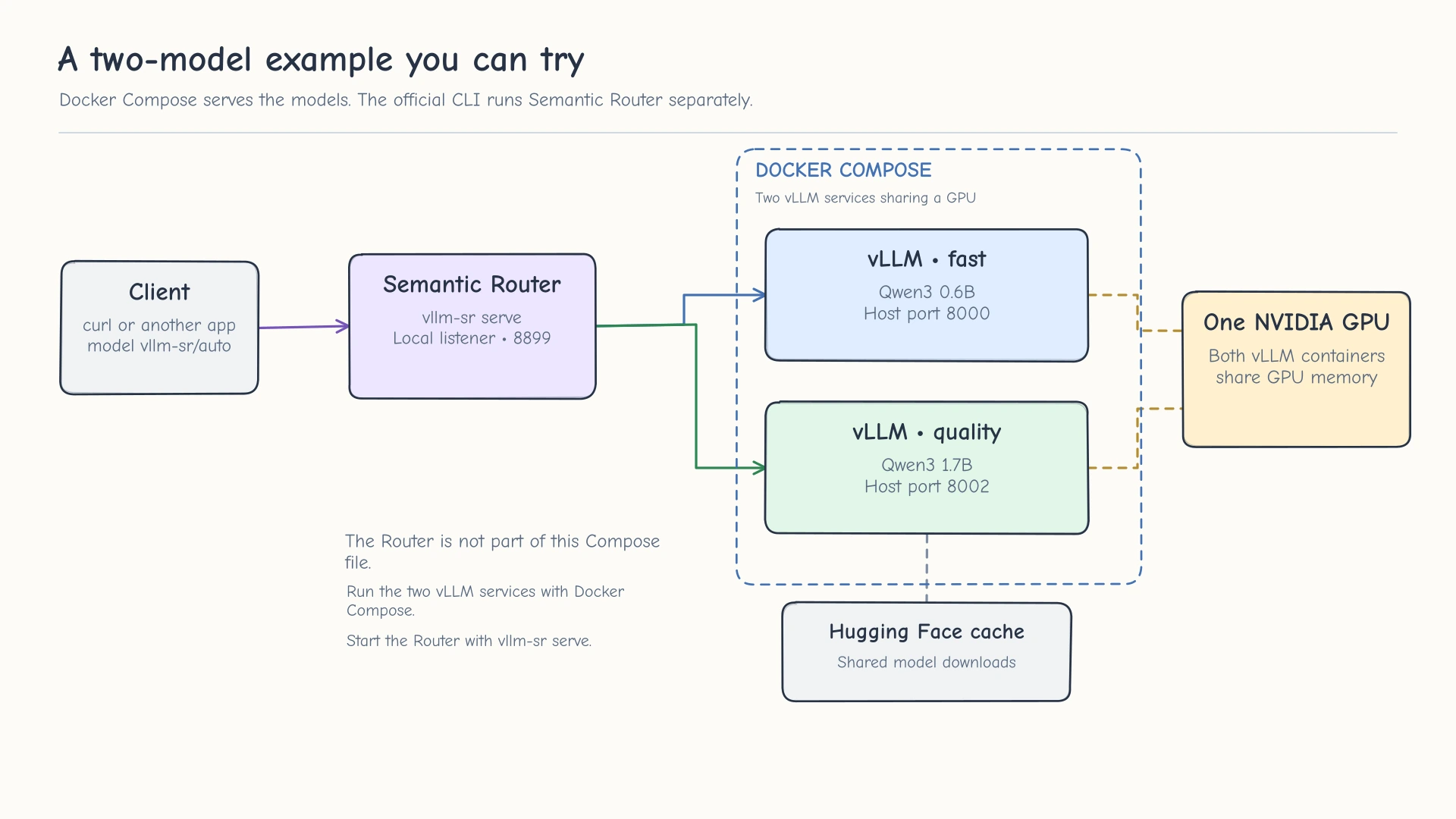
The demo keeps two vLLM backends separate from Semantic Router so you can inspect each part independently.
What this example doesn’t reproduce
You now have two real model servers and one API that can choose between them. That’s enough to explore the routing idea, inspect the actual decisions, and see what happens when you change the model or the examples the router uses.
It doesn’t automatically give you my production AI platform. My actual configuration has separate capability and context checks, tool-aware agent traffic, specialist retrieval services, OpenVINO inference on Intel hardware, and an authenticated gateway. I also test requests with real tool histories and continuations because a simple curl prompt doesn’t exercise the same behavior as a coding agent working through a repository.
If you want to add more later, I’d start with the specific missing capability rather than recreating everything at once. Get the model servers working directly. Make sure the router can select them. Then add retrieval, more models, or an application like Open WebUI that can point to the routed API. It’s much easier to figure out where something went wrong when each piece already has a working test.
You can stop the demo with the following commands. The named Hugging Face volume remains in place so you don’t need to download both models again next time.
1
2
vllm-sr stop
docker compose down
To remove the downloaded model cache as well, use docker compose down --volumes. Don’t do that unless you actually want to delete the demo’s cached weights.
Is it worth building all of this?
If you only run one local model and you’re happy with it, you probably don’t need a routing layer. A single vLLM or Ollama endpoint is simpler to run and troubleshoot. I started looking at routing because I was already managing multiple models and didn’t want my applications to care which machine served each request.
The part I like most so far is being able to give hardware a more specific job. The 3060 doesn’t have to pretend to be my biggest coding model, and the 3090 doesn’t need to spend all its time answering little questions or making embeddings. The Intel NPU and integrated GPU also give me a place to experiment with speech and vision without consuming more NVIDIA memory.
But the routing needs to be correct before any efficiency gain is useful. I’m still working through some of the harder cases, especially retrieval, multimodal requests, and agent tool compatibility. I’d rather find those problems while testing than have a request quietly lose context or land on a backend that can’t finish it.
I’m sure I’ll keep changing the models as better options come out. But now I can make those changes behind one endpoint, rather than reconfiguring Copilot, Open WebUI, and Home Assistant every time I change my mind. I’m still spending plenty of time on the routing policy itself, especially the cases where a wrong decision quietly looks like a model problem.