Automatic local AI model routing with NVIDIA Switchyard

I’ve been running a few local models, and I don’t really want to choose one before every request. A faster model might handle most of a coding task just fine, but sometimes the agent could run into a failing test or start chasing an error that needs a little more reasoning. I could send everything to the most capable model, but I’d also be waiting on it for work the faster one could have handled.
So I started looking at NVIDIA Switchyard. It sits between the client and the models and decides where each request should go. I wanted to see whether it could handle that decision while the agent was working, without me having to keep switching models myself.
The setup
I used GitHub Copilot for the tests because that’s what I normally use. It sent requests through Switchyard, with Nemotron 3.5 Lightning on an RTX 3090 and DeepSeek V4 Flash 0731 running across two GX10s.
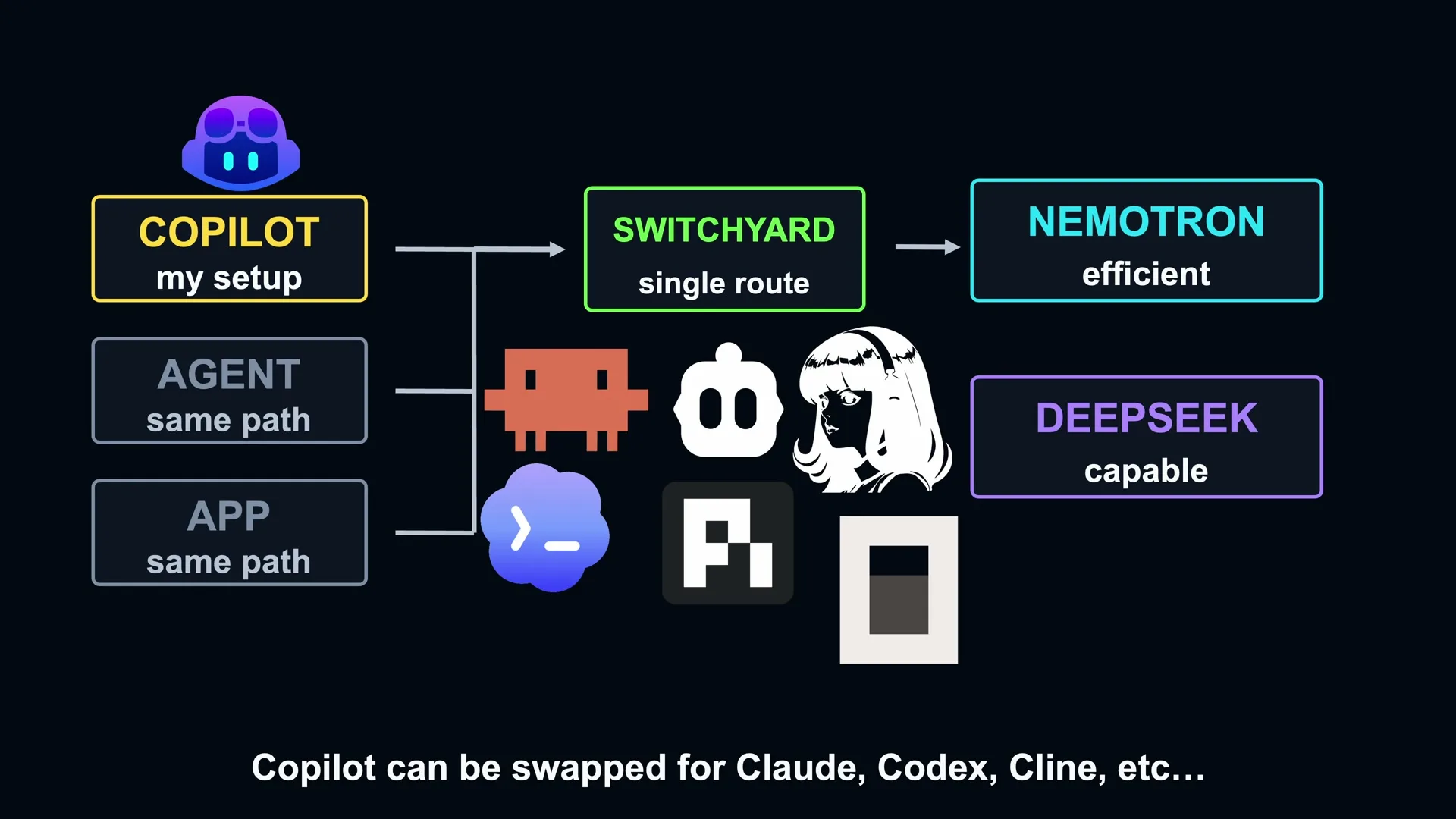 Switchyard routes agent requests between Nemotron on the RTX 3090 and DeepSeek on two GX10s
Nemotron was the efficient model and DeepSeek was the capable model. Those are Switchyard’s names for the two roles. In this setup, I wanted most requests to stay on Nemotron and DeepSeek to be available when Stage thought the work needed it.
The Nemotron checkpoint was nvidia/NVIDIA-Nemotron-3.5-Lightning-30B-A3B-NVFP4. It’s a sparse mixture-of-experts model with about 30 billion parameters and roughly 3 billion active per token, running on one RTX 3090 with 24 GB of VRAM. The capable checkpoint was deepseek-ai/DeepSeek-V4-Flash-0731.
I wasn’t expecting DeepSeek to be better at every task. What I needed was a useful difference between them, with Nemotron handling normal work quickly and DeepSeek able to help with some of the tasks Nemotron couldn’t finish.
Getting Nemotron running properly
The first time I tested Lightning, I was only getting around 44 tokens per second. That didn’t really make sense because speed was the reason I was looking at it, so I went back through my vLLM configuration.
I had --enforce-eager enabled, which meant vLLM wasn’t using CUDA graphs. After removing it and testing again, Nemotron was running at around 198.5 output tokens per second. The dense Qwen 27B model I was comparing it with was around 43.5 tokens per second, so Nemotron was about 4.6 times faster on decode in that test. Prefill was more than five times faster too.
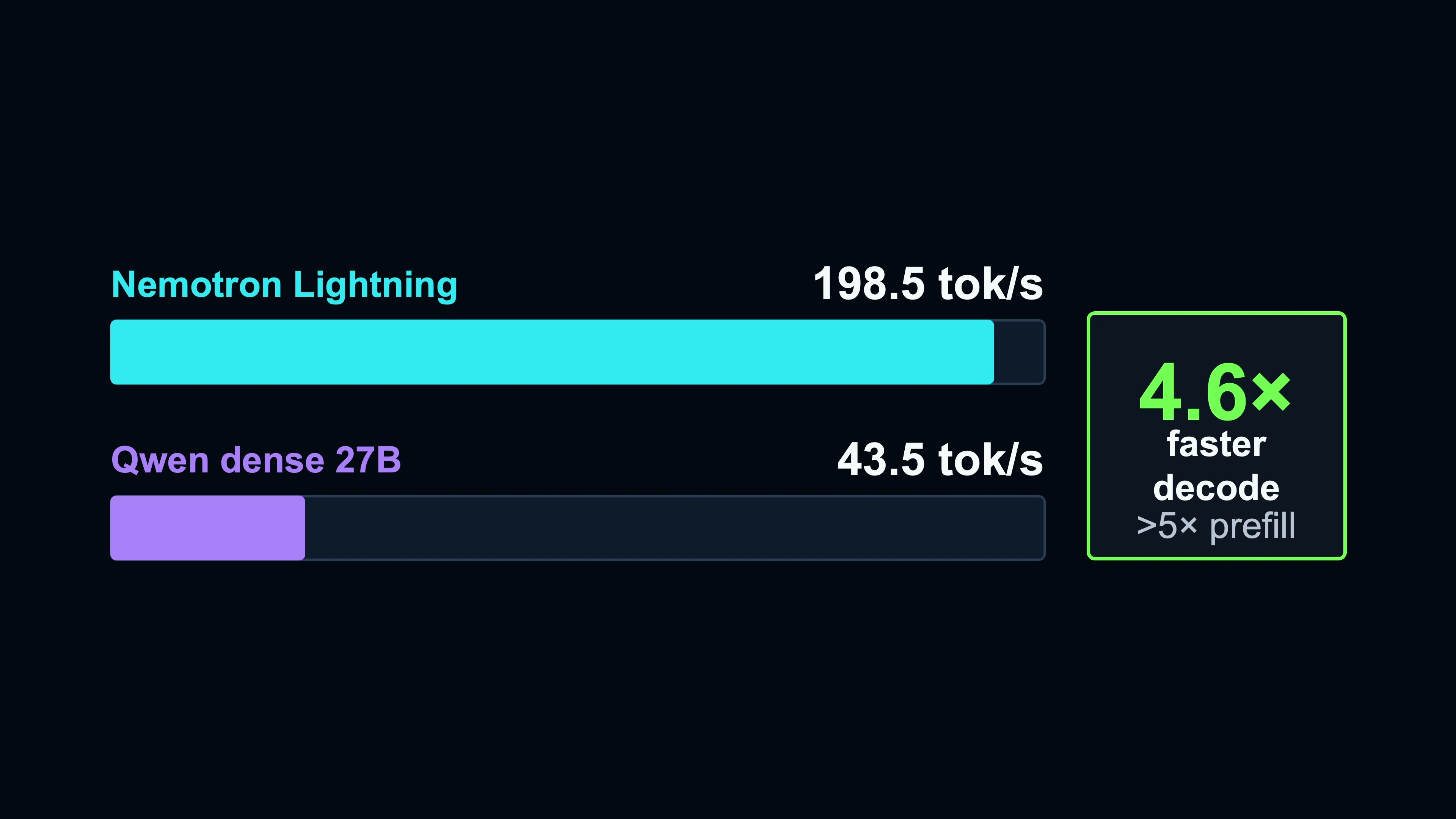 Nemotron Lightning compared with dense Qwen 27B after enabling CUDA graphs
That made Nemotron more interesting as the efficient model, but it also meant the earlier result wasn’t telling me much about the model itself. I’d been comparing it with a serving configuration that was holding it back. The full vLLM configuration is included below, along with the larger context setting I ended up using.
Why I chose Stage routing
I went with Stage routing because the model I need at the start of a task isn’t necessarily the one I need for the whole session. Reading a few files and making a straightforward change might be fine on Nemotron. Working through a test failure could be a better use of DeepSeek.
Stage uses the tool-result history already in the conversation to help make that decision. It looks for things like errors, repeated attempts without progress, and whether the agent is reading files or making changes. It doesn’t need to classify the entire task from the first prompt and stay with that choice.
I started with these settings. Nemotron was the default, and Stage used a confidence threshold of 0.5 with a recent tool-result window of 3.
1
2
3
picker = "efficient_first"
confidence_threshold = 0.5
recent_turn_window = 3
With efficient_first, requests stay on Nemotron when the signals don’t clearly point elsewhere. The recent window gives Stage the last three tool results to work with, so a failed test can influence where the next request goes. It doesn’t mean every failed test automatically sends the agent to DeepSeek.
I also left the optional LLM classifier off. That would add another model call to some routing decisions, and I wanted to see what Stage was doing without mixing those calls into the results.
The first routing tests
I started with a separate set of ten coding tasks. Six timed out on the first run, so I tried raising the confidence threshold and enabling the classifier. The next run timed out on nine of ten tasks and switched between the models more often.
At that point I stopped tuning the router and tested the models directly. I wanted to find tasks where Nemotron failed and DeepSeek passed, since those were the cases where switching to DeepSeek might actually help. Across eleven valid paired tasks, I found three of those cases, all involving protected-key or prototype-related behavior.
One of the tasks still looked strange through the router. DeepSeek could solve it directly in about 276.5 seconds, but through Switchyard it first appeared about 23 seconds into the run and the task timed out at 300 seconds. I initially thought Stage was moving between the models too often, so I started looking more closely at the routing data.
Why more requests were reaching DeepSeek
One diagnostic run had 48 routing decisions. Nemotron handled 26 and DeepSeek handled 22, which made it look like Stage was sending almost half the requests to DeepSeek.
But Stage had only selected DeepSeek six times. The other 16 were context fallbacks because Nemotron was still configured with a 32K context limit. Some of the coding requests were already larger than that.
Stage could choose Nemotron, but vLLM would reject the oversized request and Switchyard could try DeepSeek instead. Looking only at the model that answered made those requests look like routing decisions based on the difficulty of the work.
That explained why I was seeing more DeepSeek traffic as sessions got longer. I’d been changing the router settings when Nemotron mostly needed more context. Before doing any more tuning, I wanted to see what a larger context window would do to its performance.
Moving Nemotron to 128K
I tested 32K, 64K, and 128K context limits. These were separate from the initial speed comparison, with output throughput staying fairly close across the three configurations.
| Configured context limit | Output throughput |
|---|---|
| 32K | About 183 tok/s |
| 64K | About 184 tok/s |
| 128K | About 174 tok/s |
The larger context came with a small drop in generation speed, but that seemed like a reasonable tradeoff for these coding sessions. I moved Nemotron to 128K and ran the routing tests again.
On the task where 22 of 48 requests had reached DeepSeek, that dropped to 3 of 45. All three were Stage selections, with no context fallbacks.
| Configuration | Nemotron | DeepSeek | DeepSeek selected by Stage | Context fallbacks |
|---|---|---|---|---|
| 32K | 26 | 22 | 6 | 16 |
| 128K | 45 | 3 | 3 | 0 |
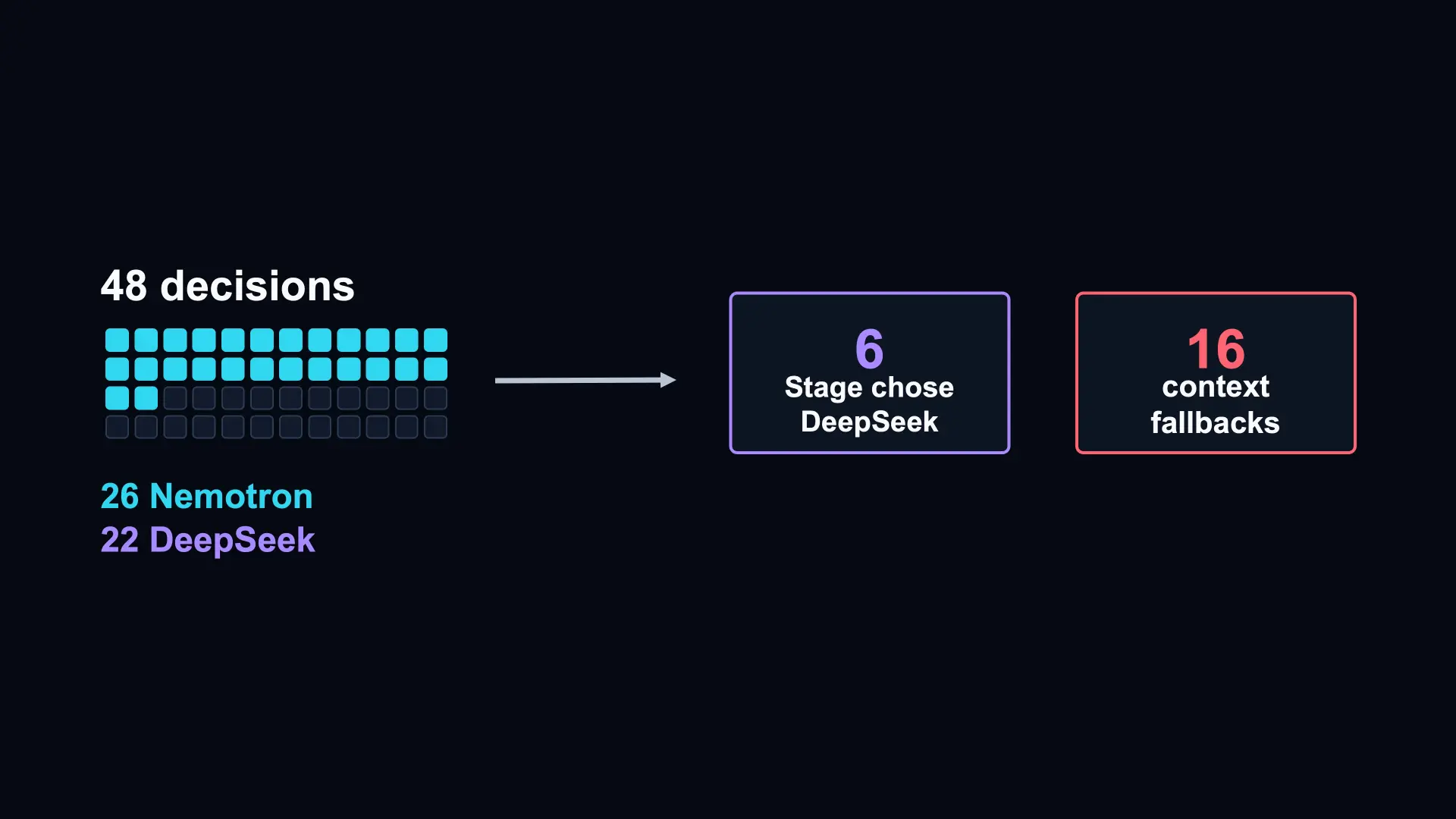 32K context limit with the smaller model (Nemotron Lightning), more fallbacks without real routing decisions
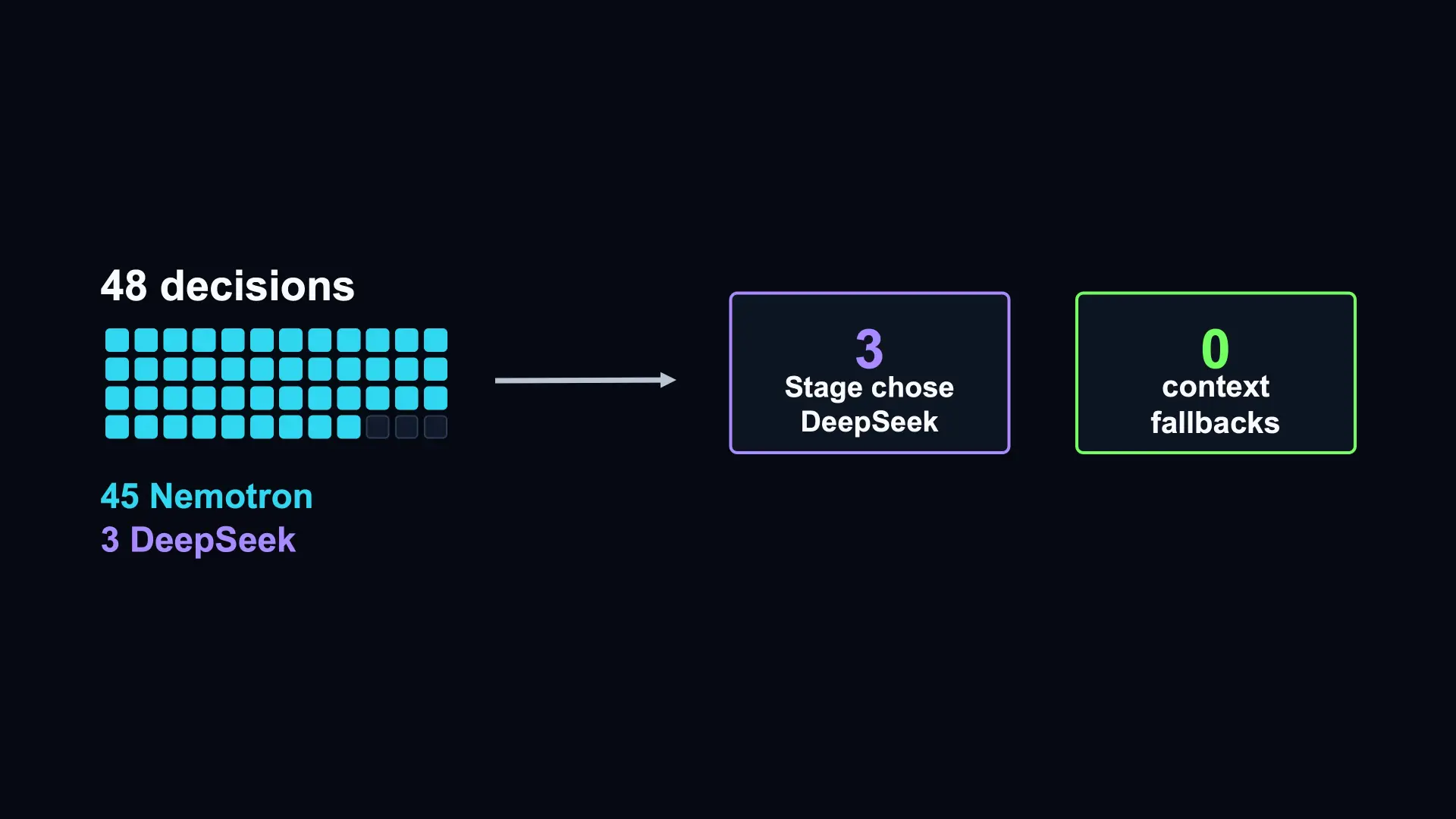 After raising the context limit to 128K on the smaller model (Nemotron Lightning)
I also went back to a task Nemotron hadn’t solved on its own. Through Switchyard, it passed with 75 Nemotron decisions and eight DeepSeek decisions. All eight DeepSeek selections came from Stage, again with no context fallbacks.
That gave me a better idea of what the router was doing. Nemotron could now accept the longer conversations, so DeepSeek wasn’t being used just because the request didn’t fit.
Testing it on LittleLink Server
The smaller tasks helped me work through the configuration, but I wanted to try something closer to the code I work on every day. I used LittleLink Server, my TypeScript, Node, and Next.js application for hosting a links page in Docker.
The task was to build a comprehensive automated test suite. I made a separate copy of the repo and removed the existing tests and original Git history, so the agent couldn’t just find my old tests and restore them.
From there, the agent could inspect the code, choose a test framework, install dependencies, write tests, and work through failures. I wasn’t choosing the model or stepping in after every few requests.
The automation around this took longer than I expected. I ended up with an outer agent that could launch the coding agent, watch the run, and collect the results. It was more than I originally planned to build, but it let me run the longer tests without sitting there watching them.
I also had to adjust the benchmark itself. I’d initially required 100% coverage, and the agent was spending too much time chasing coverage rather than writing useful tests. I eventually brought the requirement down to 80%.
What Run 5 produced
Run 5 ran for about two hours and 20 minutes. The agent produced 334 tests across 20 test files and 24 suites, with about 3,317 lines of test implementation. Every source file had test coverage, though that doesn’t mean every behavior was covered.
The best observed coverage was 94.5% for statements, 97.8% for branches, 97.7% for functions, and 95.9% for lines. The build passed, type checking passed, lint passed, and the tests passed. But the benchmark still marked the run as a failure.
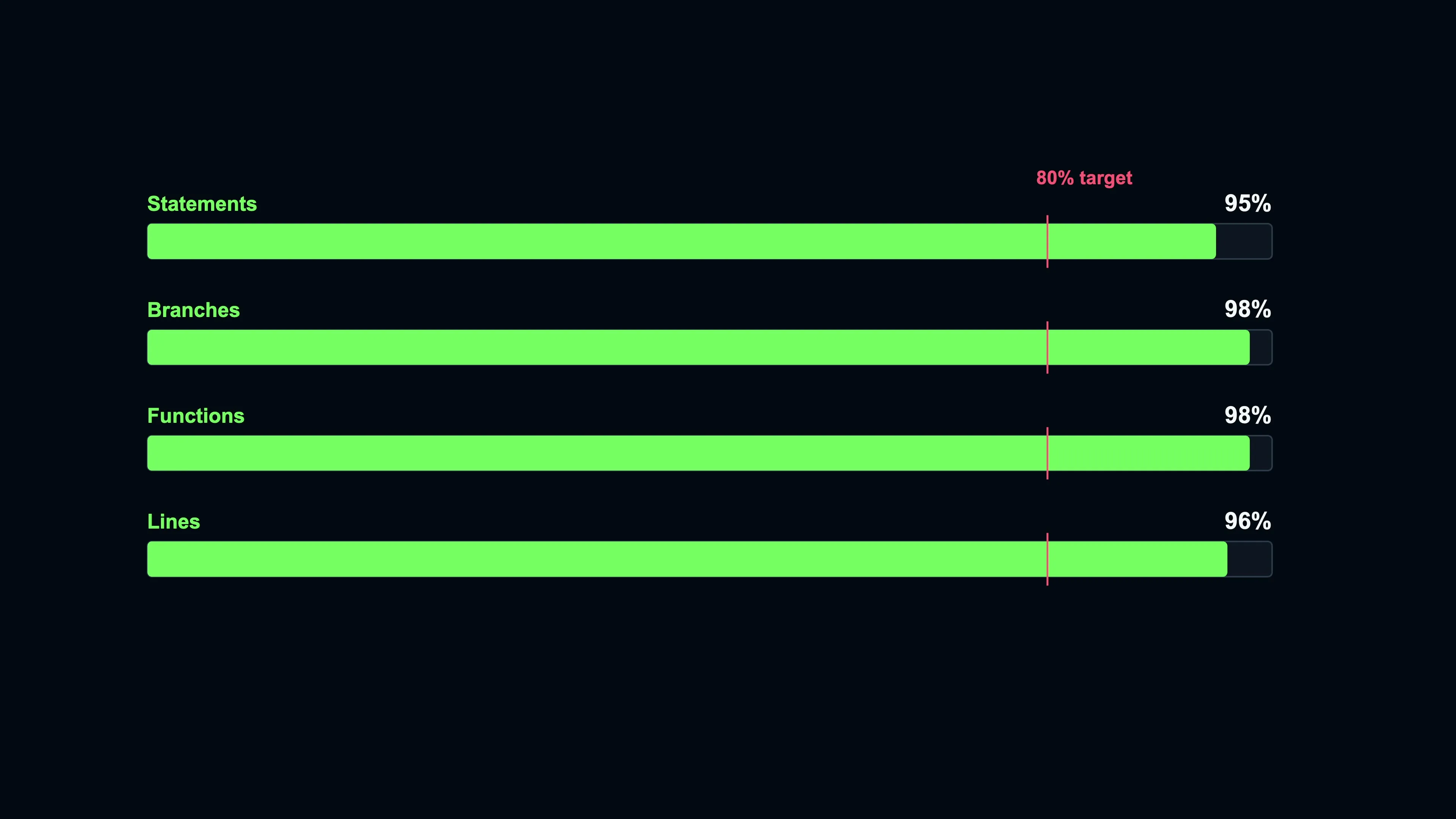 Run 5 coverage report and benchmark result
My anti-gaming detector thought it had found a skipped test in server.test.ts. When I went back through the result afterward, that turned out to be a bug in the detector. The agent hadn’t skipped the test to get around the requirements, but the run was still recorded as a failure.
The code from that run is in LittleLink Server PR #904. I left it as it came out of the evaluation, without cleaning up the implementation, so the diff shows the work the agents actually produced.
The routing split was 1,173 Nemotron decisions and 165 DeepSeek decisions. About 87.7% stayed on Nemotron, with no context fallbacks.
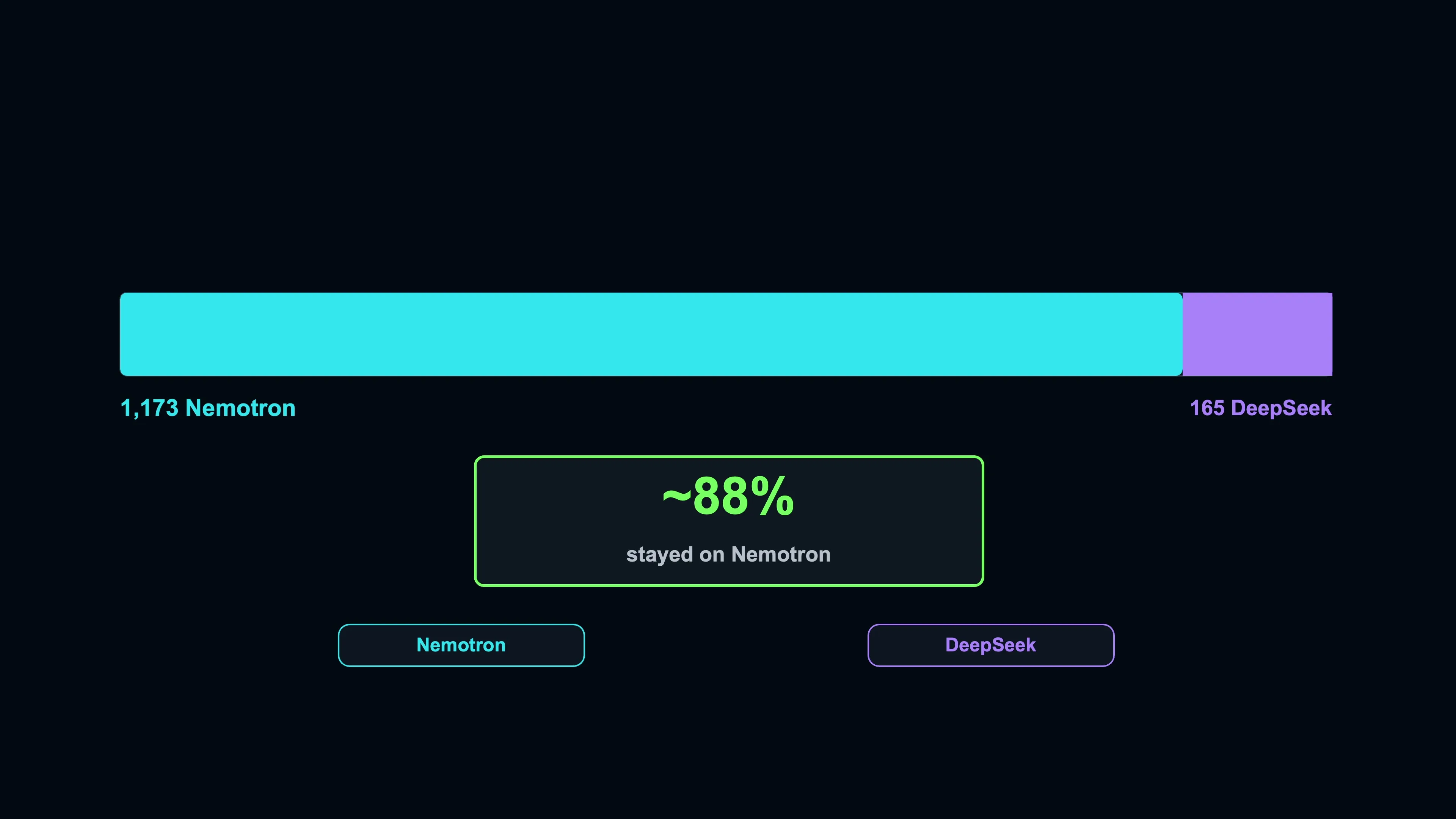 Run 5 routing split between Nemotron and DeepSeek
DeepSeek was local too, so I wasn’t paying per token for those requests. The 87.7% describes model selections, not token usage or money saved. For this run, though, most requests stayed on the faster model while the agent worked through the task, which was pretty close to what I was hoping for.
Could this help with API costs?
I’d also like to try a paid frontier model in place of DeepSeek. That could be a way to keep API costs down without needing enough local hardware to host the capable model too.
I haven’t tested that combination yet. I’d compare it with sending the same tasks directly to the frontier model and look at the results and total cost, including running Nemotron locally. The requests sent to the API could contain longer conversations, so I’d need the actual token usage to see whether routing saved money.
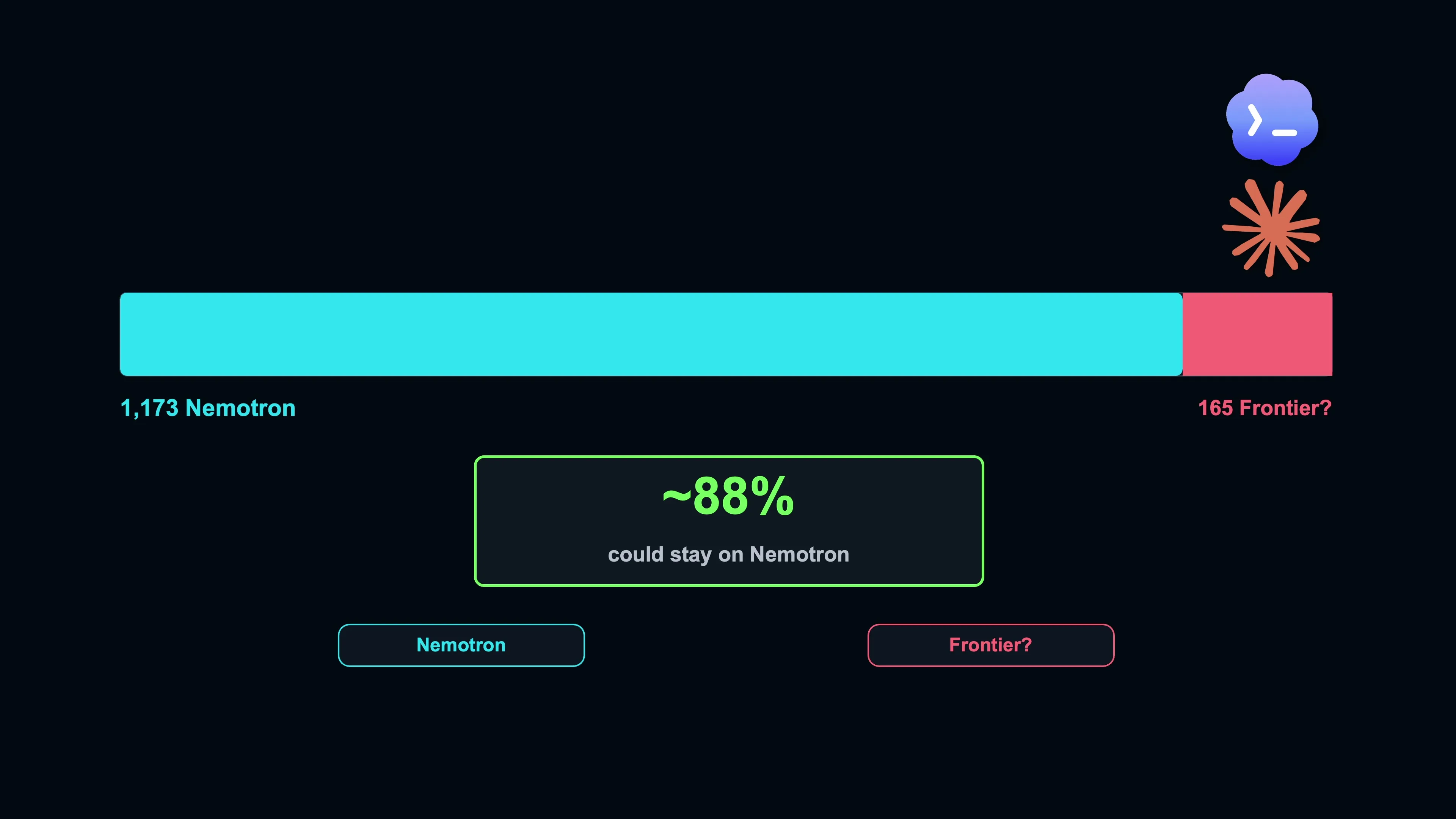 A possible local Nemotron and frontier API routing split to compare for cost
Where routing didn’t help
Run 6 started out reasonably well. Statement and line coverage reached about 74%, and branches were over 80%. Then statement and line coverage dropped back to around 50%, and the agent stopped making useful progress.
It kept trying to declare the task complete while its checks were still failing. The controller sent it back to work, but it continued doing the same thing until it declared it was done with the task too many times (something I added to my testing harness).
There were 785 Nemotron decisions and 156 DeepSeek decisions, roughly an 83/17 split, with no context fallbacks. The routing wasn’t really the problem in this case. DeepSeek was already available, but it hadn’t got the agent moving again.
That’s one limit of this setup. Once a request is on DeepSeek, there isn’t another model for Switchyard to move up to. A failed task still needs some investigation before I can tell whether the problem was the model, the routing, or something in the test environment.
Seeing why a model was selected
The routing data ended up being more useful than I expected. GPU activity could tell me which model was working, but it couldn’t tell me why a request had gone there. That’s how I nearly missed the difference between Stage selecting DeepSeek and a request falling back because of context.
I’d already connected my gateway to Prometheus and Grafana, so I could watch model activity and routing during the tests. Having those details together made it easier to see when the 3090 was doing the work and when requests were reaching the GX10s.
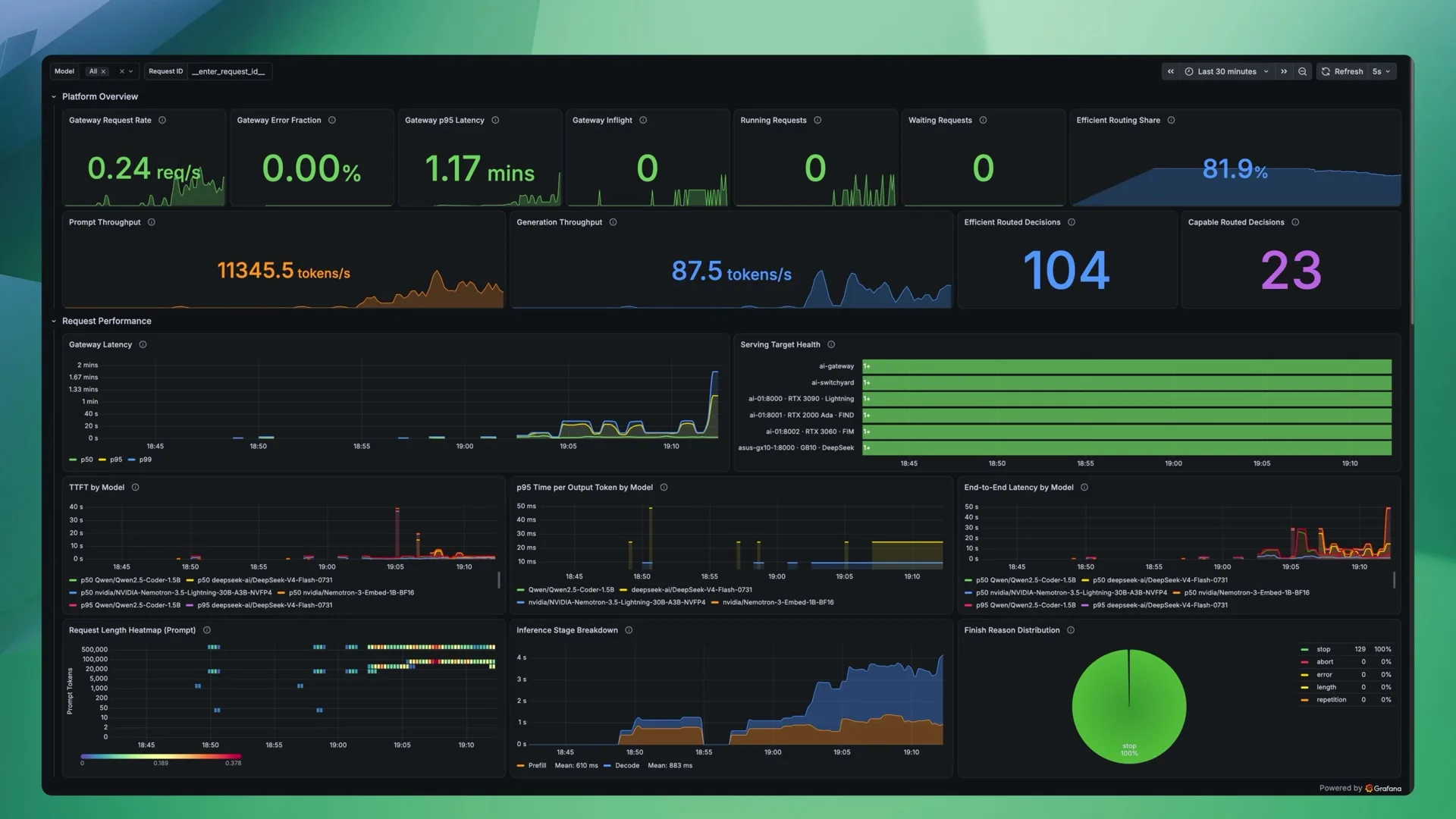 Grafana view of model activity and Switchyard routing during the tests
There’s more to that gateway, but might be covering this in a future video and post. This example only needs Switchyard and the two model endpoints.
Running the example
The configuration below runs Lightning and Switchyard on a Linux x86-64 host, with the Lightning settings I used on a 24 GB RTX 3090. You’ll need Docker Compose, NVIDIA Container Toolkit configured for Docker, enough storage for the model, and a separate OpenAI-compatible endpoint for DeepSeek or another capable model.
The measurements above used Switchyard v0.2.0 and vLLM 0.28.0. The example builds Switchyard v0.3.0, while keeping vLLM at 0.28.0. The routing behavior has changed between those Switchyard releases, so this is an updated example, not a claim that the newer release will reproduce the same results.
NVIDIA describes the standalone server as a demo and evaluation component. This example also leaves out my gateway’s authentication and TLS. The ports are published on the host, so keep them on a trusted network and don’t expose them to the internet. Switchyard seems to be a component that you integrate into your existing solutions so be aware of this if you are going to test this out in your environment.
Create a directory for these three files. Switchyard’s Dockerfile is included in the source used by the Compose build, so there’s no separate Dockerfile to create.
1
2
3
4
switchyard/
    .env
    docker-compose.yml
    routes.toml
Optional tokens
Save this as .env. Leave HF_TOKEN blank unless your Hugging Face access needs authentication, and only fill in DEEPSEEK_API_KEY when the capable endpoint requires it.
HF_TOKEN=
DEEPSEEK_API_KEY=
The Compose file reads HF_TOKEN with ${HF_TOKEN}. For DeepSeek authentication, also uncomment the environment block in Compose and the api_key_env line in TOML below.
Docker Compose
Save this as docker-compose.yml. It keeps the Lightning runtime flags from the lab but downloads the model from Hugging Face instead of depending on my local model directory. The host cache mount is optional.
1
2
3
4
5
6
7
8
9
10
11
12
13
14
15
16
17
18
19
20
21
22
23
24
25
26
27
28
29
30
31
32
33
34
35
36
37
38
39
40
41
42
43
44
45
46
47
48
49
50
51
52
53
54
55
56
57
58
59
60
61
62
63
64
65
66
67
68
69
70
71
72
73
74
75
76
77
78
79
80
81
82
83
84
85
86
87
88
89
90
91
92
93
94
95
96
97
98
99
100
101
102
103
104
105
106
107
108
109
110
111
112
113
114
115
116
117
services:
  lightning:
    image: vllm/vllm-openai:v0.28.0
    container_name: lightning
    restart: unless-stopped

    ipc: host
    shm_size: "8gb"

    ports:
      - "8000:8000"

    environment:
      HF_TOKEN: ${HF_TOKEN}

    # Optional. Keep downloaded model files on the host so they survive
    # container replacement. Without this mount, vLLM can still download
    # and run the model, but a new container will need to download it again.
    # Remove this whole volumes block to use the container's own storage.
    volumes:
      - ./hf-cache:/root/.cache/huggingface

    command:
      - --model
      - nvidia/NVIDIA-Nemotron-3.5-Lightning-30B-A3B-NVFP4

      # This is the model ID Switchyard sends to vLLM.
      - --served-model-name
      - nvidia/NVIDIA-Nemotron-3.5-Lightning-30B-A3B-NVFP4

      - --host
      - 0.0.0.0
      - --port
      - "8000"

      # The memory setting used on my dedicated 24 GB RTX 3090.  If it crashes due to memory, lower this
      - --gpu-memory-utilization
      - "0.98"

      # The earlier 32K limit caused context fallbacks during coding runs.
      - --max-model-len
      - "131072"

      # Limit the tokens scheduled in a batch, not the conversation length.
      - --max-num-batched-tokens
      - "4096"

      # Limit concurrent sequences to leave room for the larger context.
      - --max-num-seqs
      - "4"

      # Load the ModelOpt NVFP4 checkpoint with the backends I tested.
      - --quantization=modelopt_fp4
      - --moe-backend=humming
      - --linear-backend=humming

      # Mamba settings used for this hybrid model.
      - --mamba-backend=flashinfer
      - --mamba-cache-mode=align
      - --mamba-ssu-algorithm=simple

      # Parse reasoning and tool calls for the OpenAI-compatible API.
      - --reasoning-parser=nemotron_v3
      - --tool-call-parser=qwen3_coder
      - --enable-auto-tool-choice
      - --enable-prefix-caching

      # Leave --enforce-eager out so vLLM can use CUDA graphs (the mistake I made at first).

    deploy:
      resources:
        reservations:
          devices:
            - driver: nvidia
              count: 1
              capabilities:
                - gpu

    healthcheck:
      test:
        - CMD
        - python3
        - -c
        - "import urllib.request; urllib.request.urlopen('http://localhost:8000/health', timeout=5)"
      interval: 30s
      timeout: 10s
      retries: 40
      start_period: 300s

  switchyard:
    build:
      context: https://github.com/NVIDIA-NeMo/Switchyard.git#v0.3.0

    container_name: switchyard
    restart: unless-stopped

    depends_on:
      lightning:
        condition: service_healthy

    ports:
      - "8011:4000"

    volumes:
      - ./routes.toml:/etc/switchyard/routes.toml:ro

    # Uncomment this block if your capable endpoint needs a bearer token.
    # environment:
    #   DEEPSEEK_API_KEY: ${DEEPSEEK_API_KEY}

    command:
      - --config
      - /etc/switchyard/routes.toml
      - --host
      - 0.0.0.0
      - --port
      - "4000"
Switchyard routes
Save this as routes.toml. Replace <deepseek-host> with the address of your capable endpoint, including the correct protocol and port. Its model ID needs to match the name served by that endpoint, and the two 524288 context values need to match the context it actually supports.
I kept direct routes for both models as well as the Stage route. That lets me test Nemotron or DeepSeek separately without changing the deployment. The TOML reference covers the settings in more detail.
1
2
3
4
5
6
7
8
9
10
11
12
13
14
15
16
17
18
19
20
21
22
23
24
25
26
27
28
29
30
31
32
33
34
35
36
37
38
39
40
41
42
43
44
45
46
47
48
49
50
51
52
53
54
55
56
57
58
59
60
61
62
63
64
65
66
67
68
69
70
71
72
73
74
75
76
77
78
79
80
81
82
schema_version = 1

# Clients define how Switchyard connects to each model server.
# Docker resolves "lightning" to the service in this Compose project.
[llm_clients.lightning]
format = "openai_chat"
base_url = "http://lightning:8000/v1"

# I kept retries off during testing so upstream failures stayed visible.
# Context-overflow fallback is separate from these client retries.
max_retries = 0

# Replace this with the capable endpoint that Switchyard can reach.
# Localhost here would mean the Switchyard container itself.
[llm_clients.deepseek]
format = "openai_chat"
base_url = "http://<deepseek-host>:8000/v1"
max_retries = 0

# Uncomment this when using the token passed in through Compose.
# api_key_env = "DEEPSEEK_API_KEY"

# Targets pair the upstream model ID with a configured client.
[targets.lightning]
id = "nvidia/NVIDIA-Nemotron-3.5-Lightning-30B-A3B-NVFP4"
llm_client = "lightning"

[targets.deepseek]
id = "deepseek-ai/DeepSeek-V4-Flash-0731"
llm_client = "deepseek"

# Direct Nemotron route for testing without Stage routing.
[routes.lightning]
id = "local/lightning"
type = "passthrough"
target = "lightning"

# Advertise the context configured in vLLM.
# This doesn't set or increase the model server's actual limit.
context_window = 131072

# These declarations don't enable capabilities on the model server.
# The server still needs the appropriate tool and reasoning configuration.
tool_calling = true
reasoning = true

# Direct DeepSeek route for testing the capable endpoint separately.
[routes.deepseek]
id = "local/deepseek"
type = "passthrough"
target = "deepseek"
context_window = 524288
tool_calling = true
reasoning = true

# The coding agent uses this model ID for automatic routing.
[routes.coding]
id = "local/coding"
type = "stage_router"
capable_target = "deepseek"
efficient_target = "lightning"

# Use Nemotron when the signals don't clearly favor another choice.
picker = "efficient_first"

# The confidence threshold used for signal-based routing in these tests.
# Stage also has built-in overrides for certain conditions.
confidence_threshold = 0.5

# Compute recent signals from the last three tool results.
recent_turn_window = 3

# Version 0.3 can hold recovery turns on the capable model after escalation.
# Zero disables that hold, but doesn't undo other changes since 0.2.
capable_hold_turns = 0

# Advertise the context supported by the capable endpoint.
context_window = 524288
tool_calling = true
reasoning = true

# No classifier block is configured, so Stage doesn't call an LLM judge.
vLLM’s --max-model-len sets the model’s actual context limit. Switchyard’s context_window advertises the route’s capacity to clients, but doesn’t make the backend accept a larger request.
There is also a difference in context fallback behavior between the two Switchyard versions. In v0.2.0, a recognized overflow could exclude a target for the rest of a session. In v0.3.0, the fallback only applies to the current request, so Stage may try that model again on the next turn. Disabling capable_hold_turns doesn’t restore the older behavior.
Check the configuration and start the services
First check Compose, then build Switchyard and have it load the TOML. The dry run checks the route configuration without starting Lightning or sending a request to either model.
1
2
3
4
5
docker compose config --quiet

docker compose run --build --rm --no-deps switchyard \
  --config /etc/switchyard/routes.toml \
  --dry-run
The dry run should print the route IDs and exit successfully. It doesn’t check whether DeepSeek is reachable, so that still needs a real request after the services are running.
Start Lightning first and follow its logs. On the first start, it may need to download the model before loading it.
1
2
docker compose up -d lightning
docker compose logs -f lightning
Once vLLM is ready, use Ctrl+C to stop following the logs and check the model endpoint. The response should include nvidia/NVIDIA-Nemotron-3.5-Lightning-30B-A3B-NVFP4.
1
curl http://localhost:8000/v1/models
Then start Switchyard and check its listener and model list. /health checks Switchyard itself, while /v1/models should list local/lightning, local/deepseek, and local/coding.
1
2
3
4
docker compose up -d switchyard

curl http://localhost:8011/health
curl http://localhost:8011/v1/models
Test the direct routes first
I found it easier to check each model before looking at Stage decisions. This request goes through Switchyard but uses the direct Nemotron route.
1
2
3
4
5
6
7
8
9
10
11
curl -i http://localhost:8011/v1/chat/completions \
  -H "Content-Type: application/json" \
  -d '{
    "model": "local/lightning",
    "messages": [
      {
        "role": "user",
        "content": "Write a TypeScript function that validates a UUID."
      }
    ]
  }'
Repeat it with "model": "local/deepseek" to check the capable endpoint. Once both direct routes answer, send the request to local/coding.
1
2
3
4
5
6
7
8
9
10
11
curl -i http://localhost:8011/v1/chat/completions \
  -H "Content-Type: application/json" \
  -d '{
    "model": "local/coding",
    "messages": [
      {
        "role": "user",
        "content": "Write a TypeScript function that validates a UUID."
      }
    ]
  }'
The -i option includes response headers. x-model-router-selected-model identifies the model that answered, and /v1/stats shows the accumulated usage and routing statistics.
1
curl http://localhost:8011/v1/stats
A single prompt checks that requests can get through, but it doesn’t give Stage much to work with. For the kind of routing tested here, the coding client needs to send the conversation history and tool results with later requests. Point the client at http://localhost:8011/v1 and use local/coding as the model ID.
Where I landed
I think I’ll keep Switchyard around. Run 5 is probably the best example of why, with most requests staying on Nemotron while the agent got through the work. I still had to look at the actual code and investigate the benchmark failure, but I wasn’t deciding which model should handle each turn.
Nemotron also seems like a good general-purpose model for agent work. It’s fast, and it handled a lot of this workload. For something focused specifically on coding, I might still use a model that does better on my own tasks, but Lightning has been a useful starting point.
I’m sure I’ll keep trying other routing options and model combinations. For now, Stage has been doing a pretty good job of keeping most requests on the 3090 and using DeepSeek when it thinks the extra capability might help. I’d rather spend some time using that setup than keep benchmarking every possible combination before I do anything with it.
Where to Buy
(Only the Amazon affiliate links may earn me a small commission at no additional cost to you.)
Related
- Local AI cluster: I Built a 256GB Local AI Cluster on My Desk
- Clean Ubuntu Server setup for GB10: Ubuntu Server on the NVIDIA DGX Spark
- Ubuntu automation repo: github.com/timothystewart6/ubuntu-gb10
- vLLM image for GB10: Running the Latest vLLM on the NVIDIA DGX Spark
- vLLM image repo: github.com/timothystewart6/vllm-gb10
- vLLM model verification: How I Build and Test vLLM for NVIDIA GB10